 |
| A B C D E F G H I J K L M N O P Q R S T U V W XYZ 0-9 |
| Latest Movie Trailers |
| Download Help |
If you're not already, then using Google's Chrome browser will avoid all download problems. For more detail on the main download issue, read on... |
Dave's Trailer Page provides direct links to trailers hosted primarily by Apple, AOL and the movie studios. With trailers from AOL and the studios simply right clicking and choosing 'Save Link As/Save Target As' will do exactly what you want it to, but any trailers from Apple will likely download incorrectly and leave you with a very small .html file instead of the desired .mov trailer file. If this is happening to you, read on to discover how to work around the problem. |
When downloading trailers from Apple their servers check your 'user-agent' and should anything other than 'Quicktime' be reported back then rather than the .mov file you will be redirected to a small .html file that points to the Apple website. To get around this you need to set your 'user-agent' to 'Quicktime' in whatever program (be it browser or download manager) you are using to download the trailers. This is not a standard feature in browsers, so an add-on or some other tweak will be required. Most dedicated download manager utilities will have an option to tweak the user-agent. |
Below are a few brief guides on how to do this... |
Chrome - In the Windows version at least (Mac version not tested), you don't have to do anything. Google Chrome - at the time of writing (July 2015 and for many years now) - handles the Apple download links perfectly fine and downloads the .mov files correctly. |
Firefox - There are two User Agent related add-ons which allow you to easily set your user-agent in Firefox. The first one - UAControl - is particularly good as once setup it just works in the background and allows you to download trailers normally. Both options are outlined below with instructions on how to use them. Please note in the following instructions I refer to the Tools pulldown menu which is located in the Firefox menu bar. In current Firefox installs the menu bar is disabled/not displayed by default, but you can just press the 'Alt' key if that is the case and the menu bar will appear. |
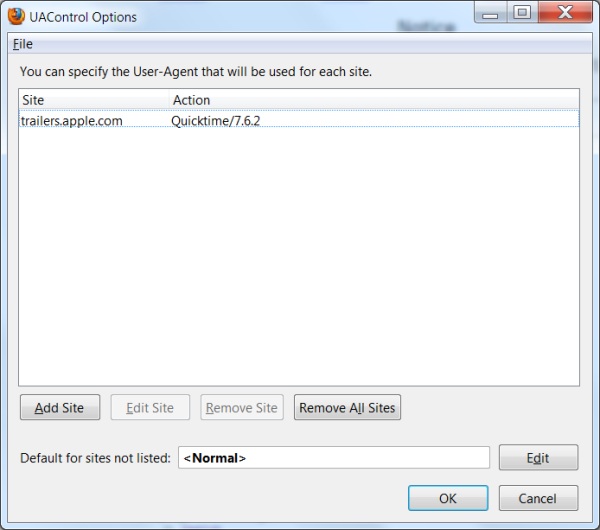
UAControl by KAKINUMA Ryoumei allows you to setup Firefox to switch user-agents whenever you visit or download via chosen urls. Follow the link and install the add-on, then access the add-on settings by clicking 'UAControl' via the Tools menu. Now click 'Add Site' and enter trailers.apple.com in the site field, click the 'custom' radio button and enter Quicktime/7.6.2 and finally click OK. With that done every time you visit the Apple Trailers page or download trailers from my site Firefox will automatically switch to the correct user-agent. |
 |
 |
User Agent Switcher by chrisperderick is a more powerful tool that lets you switch user-agents as you please via the add-on menu. It does not however automatically switch user-agents in the background, meaning you have to choose the Quicktime user-agent every time you want to download trailers. For this reason I'd recommend UAControl if all you want to do is download trailers. To setup User Agent Switcher navigate from the Tools menu and select Default User Agent>>Edit User Agents...then New>>New User Agent - from here clear all fields then enter Quicktime under Description and QuickTime/7.6.2 under User Agent. Click OK to save the newly created User Agent setting. Now, whenever you want to download a trailer access the Tools menu and select Default User Agent>>Quicktime and the download links should work when you try and watch or download them via Firefox. |
Combine either of the above with the Downthemall Download Manager add-on and you have a great all-in-one download solution for Firefox. |
WGet - For you command-line users out there then this small utility might be preferable. You can grab the Win32 version here, along with versions for other operating systems. An example of how to use it would be... |
wget -U "QuickTime/7.6.2" http://trailers.apple.com/movies/fox/iceage4/iceage4-tlr1-us_h480p.mov |
Apple OS - For Apple users the Firefox User-Agent Switcher add-on method should work. There is also a built-in command-line feature that you can use similar to wget... |
curl -A "QuickTime/7.6.2" -O http://trailers.apple.com/movies/fox/iceage4/iceage4-tlr1-us_h480p.mov |
Credit for the Mac command-line method goes to HD-Trailers.net with additional thanks to a reader who emailed to confirm it works (and correct it a little, adding the "-O" switch which makes the files save properly). |